
You press the power button. The screen flickers, the fans spin, and after a few seconds, you're looking at your desktop. It feels like magic — but beneath that simple act lies a carefully choreographed symphony of hardware and software. The conductor of this orchestra is the Operating System (OS). Today, we're going to pull back the curtain and watch every step, from the first electrical jolt to the moment you can finally click on your browser. Whether you're a curious beginner or a computer science student, by the end of this guide, you'll understand the soul of your machine.
1. The Head Chef Analogy: What Is an OS, Really?
Imagine a high-end restaurant kitchen. The hardware is the stove, knives, and ingredients. The user is the customer who wants a meal but doesn't know how to cook. The Operating System is the Head Chef. The Chef decides who gets to use the stove first (CPU scheduling). The Chef makes sure two cooks don't try to use the same knife at the same time (resource management). Most importantly, the Chef hides the messy kitchen from the customer and simply delivers the plate — that's abstraction. You don't need to know which RAM chip holds your document; the OS gives you a file icon. This abstraction is what makes computers usable.
🔍 Key Insight: Abstraction Layer
Without an OS, you'd have to write machine code to directly address hardware registers. The OS provides system calls (like open(), read(), write()) that act as a safety layer, preventing applications from corrupting each other's memory or accessing hardware in dangerous ways.
2. The Boot Process: From Dead Silicon to Running System
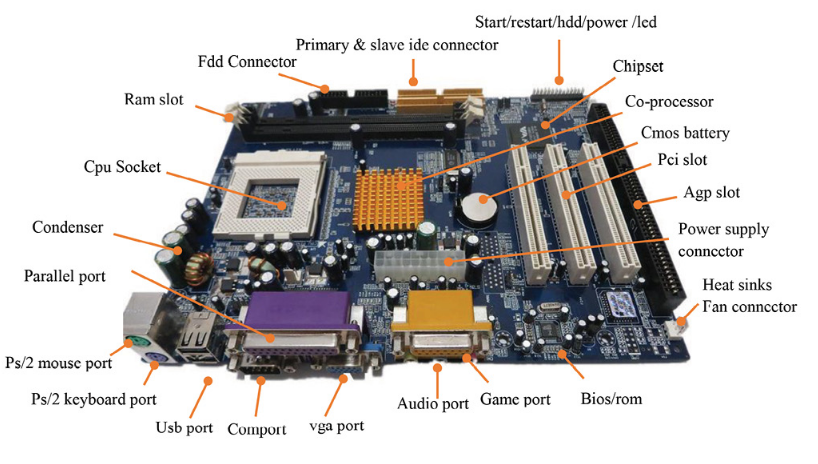
The moment you press the power button, the Power Supply Unit (PSU) sends a "Power Good" signal to the motherboard. The CPU, which is the brain, isn't smart enough yet — it needs instructions. It immediately jumps to a fixed memory address that contains the BIOS (Basic Input/Output System) or UEFI firmware. This firmware performs the POST (Power-On Self-Test), checking that RAM, storage, and peripherals are functional. If you hear a single beep, all is well.
Next, the firmware looks for a bootable drive. It reads the first sector of that drive (the Master Boot Record or GPT header) and loads the bootloader (like GRUB for Linux or Windows Boot Manager). The bootloader is a tiny program that understands file systems. Its job: locate the operating system kernel on disk, load it into memory, and hand over control. Once the kernel is in RAM, the firmware's role ends. The kernel decompresses itself, initializes hardware drivers, and spawns the first user process — usually init or systemd on Linux, or the Session Manager on Windows. From there, your login screen appears. All this happens in under 10 seconds.
3. The Kernel: The Central Nervous System
The kernel is the core of the OS. It operates in a special privileged mode called kernel mode (or supervisor mode), while applications run in user mode. Any time a program needs to access hardware — like reading a file or sending a network packet — it makes a system call, which switches the CPU to kernel mode, executes the request safely, then switches back.
Modern kernels come in different flavors. Monolithic kernels (Linux, Windows) include everything — device drivers, file systems, scheduling — inside the kernel address space for maximum performance. Microkernels (like QNX, or macOS's XNU hybrid) move most services to user space, improving stability: if a driver crashes, it doesn't take down the whole system. Apple's XNU combines a microkernel architecture with monolithic elements for performance on Mac and iOS.
📚 Further Reading: The UNIX Philosophy
The original UNIX paper by Ritchie and Thompson (1974) introduced the idea of "everything is a file," a concept that still powers Linux today. Read it on ACM Digital Library.
4. Process Management: The Illusion of Multitasking
Your computer runs hundreds of processes simultaneously — your browser, music player, system daemons. But a CPU with a single core can only execute one instruction at a time. How does it multitask? Through context switching. The OS scheduler interrupts each process after a tiny slice of time (often 10–100 milliseconds) and saves its state (registers, program counter) to memory. It then loads the next process's state. Because these switches happen so fast, human perception sees everything running at once.
The scheduler uses algorithms like Round Robin for fairness, Priority Scheduling for critical tasks, and Multilevel Feedback Queues to balance interactive and background processes. Mathematically, we measure scheduling efficiency by turnaround time (completion time minus arrival time) and throughput (processes completed per unit time).
5. Memory Management: Virtual Memory & The Paging Trick
Your programs think they have a huge, contiguous block of memory. In reality, they're using virtual memory — an abstraction where each process gets its own address space. The Memory Management Unit (MMU) in the CPU translates virtual addresses to physical addresses using page tables. When physical RAM gets full, the OS swaps less-used pages out to disk (the page file or swap partition). This allows you to run programs that need more RAM than you physically have — albeit slower.
This also enforces protection: Process A cannot access Process B's memory, because the MMU simply doesn't map those virtual addresses. Without this, a buggy app could crash the entire system.
6. File Systems: How Data Survives Power Off
When you save a file, the OS communicates with the storage device (SSD/HDD) through a file system — ext4 on Linux, NTFS on Windows, APFS on Mac. The file system organizes data into inodes, directories, and allocation tables. It ensures that when you write a file, the data is actually written to disk (or cached for speed) and that metadata stays consistent. Modern file systems also handle journaling to prevent corruption after a sudden power loss.
7. I/O Management & Device Drivers
Your computer speaks to printers, keyboards, GPUs, and network cards through device drivers — specialized software that knows the exact protocol of that hardware. The OS abstracts the differences: a program simply writes to a file, and the driver translates that into USB packets or PCIe commands. Without drivers, your hardware is just a collection of metal and silicon.
8. A Brief History: From Batch to Distributed Systems
Early computers ran batch systems: one job at a time, no user interaction. Then came time-sharing (Unix, 1970s), where multiple users interacted with the system simultaneously via terminals. The rise of personal computers brought Windows and macOS to the masses, while Linux emerged as a free, open-source Unix-like system. Today, we see distributed OSes managing thousands of servers as one entity, and real-time OSes (RTOS) like FreeRTOS controlling medical equipment and autonomous vehicles.
9. Modern Frontiers: Virtualization, Containers, and IoT
The OS landscape is evolving rapidly. Hypervisors (like VMware or KVM) allow multiple OSes to run on one physical machine, essential for cloud computing. Containers (Docker, Kubernetes) package applications with their own runtime environments, making deployment predictable. In the IoT space, OSes must be lightweight and secure, often using microkernel architectures to isolate critical functions. The next generation of OSes may be "intelligent kernels" that use AI to predict workload patterns and optimize power consumption in real-time.
10. Conclusion: The OS as Ultimate Abstractor
"An operating system is the most complex software artifact ever created — and also the most taken for granted."
From the bootloader to the scheduler, from virtual memory to device drivers, the OS is a master of illusion. It makes one CPU look like hundreds, makes limited RAM look infinite, and turns raw silicon into a platform for creativity. Next time you turn on your computer, you'll know the hidden dance happening beneath your fingertips. And if you ever want to dive deeper, the resources below will guide you to the next level of understanding.
📚 References & Further Reading (Curated Backlinks)
1. Operating System Concepts (Silberschatz, Galvin, Gagne) — The classic textbook used in universities worldwide. Wiley Higher Education
2. The UNIX Time-Sharing System (Ritchie & Thompson, 1974) — The original Bell Labs paper that defined modern OS design. ACM Digital Library
3. The Linux Kernel Archives — Browse the source code of the most successful open-source kernel. Kernel.org
4. Windows Internals (Russinovich, Solomon, Ionescu) — The definitive guide to the Windows NT kernel. Microsoft Press
5. Operating Systems: Three Easy Pieces (OSTEP) — A free, highly readable online textbook. OSTEP Online